AKA how I made £2.46 in a week.
I’m sure there’s a really long epic paragraph I should write here about my entrepreneurial spirit yadder yadder. Mostly I’ve had dumb ideas, bought domains and never got any closer to a ‘business model’ than that. I’ve seen people ‘building in the open’ and it some across so much like a pyramid scheme it makes me skin itch.
That said, I’ve always had the desire to ’round out’ my experience, go in-house when at consultancy, move into digital, work in the public sector etc so this feels like a *tiny* step in the direction of rounding out my experience in another direction.
Anyway, no epic intro paragraph.
Last Wednesday whilst watching the football I mocked up some posters. People liked/commented more than I’d normally get on posts…so I figured maybe it was an idea worth improving. So I tidied them up and posted again – again decent response.
By that point I’d decided that I’d see if i could turn them into posters people could buy. I knew I didn’t want people to rely on me sending them out, and I definitely don’t have production print ready kit here. So I turned to ‘print on demand’ services (side note, this is also called drop-shipping, but given drop-shipping is normally with shipping generic tat across the world I’m using print-on-demand).
What service did I choose?
You can do your own searches for print on demand suppliers. I initially settled on Printify because it seemed to have a good range of stuff. Not every option has every product, some specialise in clothing etc. I went through the process of setting up products with my posters, the main note here is that they have lots of different formats of portrait poster and they need it super hi res. I was exporting direct out of Figma (not intended for print) and in the end I exported at 5904×8858 pixels. Big eh? Then when setting the ‘product’ up you realise that whilst there’s about 20 different possible portrait poster sizes, that specific ratio only really fits 2 of them – so I could have exported lots of others for different ratios, but I didn’t. This was meant to be a quick experiment after all.
After setting a bunch of products up, I plugged in an Etsy account – I’d actually created one a while ago for another stalled idea, but never activated it. So I made the necessary name changes and paid the £15 activation fee to get it up and running. Plugging Etsy into Printify was pretty self explanatory – just a few sign ins and confirmations to do. Once the integration is made you can sync the products you’ve created to the store – setting individual prices for each. Its worth noting that Etsy has some criteria for what you can and can’t sell on its site. I did explore using the Printify shop service, but it was only available in the US at the time I tried.
One of my big concerns about print on demand was print quality (would people order and be disappointed). This was one reason I chose Printify – it has ‘museum grade’ paper etc. As part of this I wanted to order a sample so I knew what it would be like, so I added a couple of things to my basket and the total shipping came to something like £16! I balked, and I knew other people would too – I had checked that the products were coming from the UK (or at least could do) but couldn’t understand what made the shipping so expensive. So I binned off Printify.
Loaded up Printful which honestly is such a carbon copy its very hard to tell the difference (apart from maybe that they have a physical location in Wolverhampton, UK which might help with the shipping thing…). Either way I had to do the whole loading products again (but now a slightly different selection of print sizes!?) and integrating with Etsy. Whilst this was a pain, having done it once made it all slightly smoother. So long story short, I’ve ended up using Printful because the shipping rates to the UK were better than Printify. I’ve not tried most of the other services.
Creating products
This is where the bulk of setting things up lies. Its a process of uploading artwork (assuming you’ve already created it – you can create stuff using their own tools too) and moving it around on an editor tool.
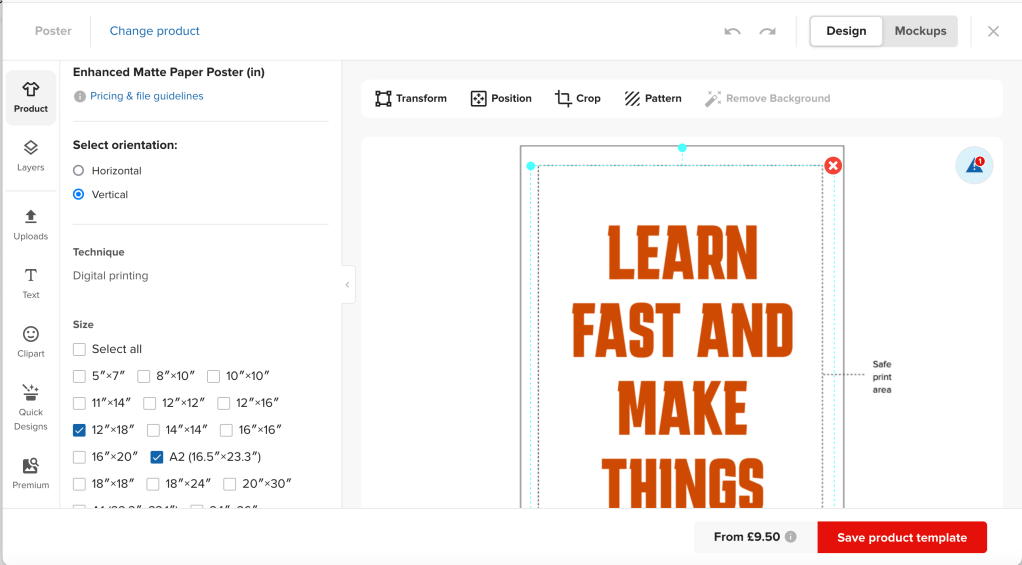
Assuming your artwork is pretty finalised, the main work is in selecting the ‘product variations’ you’ll offer and then scaling/tweaking to perfect how the artwork shows on each one. I’ve used the above image because it shows how with products with a transparent background you have a bit more freedom to position on different sizes than a product with a full bleed background. In those cases I had to only choose the perfect fitting size variations.
I’ve only really done prints. I have dabbled looking at notebooks and mugs, and some of the way it repeats the artwork is fairly unexpected, but can be tweaked to make it sit better.
There’s a lot of room for flexibility here, but also room for error. I was very aware that as soon as I hit publish someone could *theoretically* buy the thing, so I didn’t want to risk messing a variation up and then someone getting a dud product. Side note here that one difference I found between printify and Printful was that Printful didn’t *actually* push it live on Etsy when you hit publish, which is desirable because Etsy charges you a $0.20 listing fee. Printful adds it to your ‘inactive listings’ where you can then activate it afterwards. That is a good idea…but it took me a while to work out why nothing was showing in my store!
Printify and prinful both ad mockup creator tools, which is handy as someone who hadn’t yet seen the thing in order to take a photo of it. They aren’t *great* – they look pretty fake (they are) but they do the job I guess. If I still had a Photoshop license, I might do some myself – Its just occurred to me that there’s almost certainly a better tool out there for free on the internet I could try too.
Conversion and stuff
The posts about this little idea have received around 6000 unique views, 150 ‘reactions’ (although definitely duplicates there) and some comments too.
This has translated into 76 visits to the Etsy store and a grand total of…drumroll please….2 orders. Both from people I know professionally (thank you).
I share this, not because I want more orders, but its a great example of the ‘funnel’. Particularly one that has been so haphazardly optimised as mine.
I’ve gone (semi) viral on twitter twice, got a few clicks on LinkedIn and its a good reminder that likes don’t make you money necessarily. I guess the caveat to that is that *I* haven’t worked out a way to turn likes into money, some people almost certainly have.
Making money
I was nervous about adding markups to each product, trying to keep it to ‘a price that I might consider reasonable for a print’. You can set pricing (and most all product details) both on Printful and Etsy (they’re synced) but you have to hold in your head the unseen costs on both platforms. Printful shows you the markup you’re making over the cost you pay for the product (and you do pay for the product – more on this later), Etsy assumes you’re not paying for the product and just tells you about your fees/charges to them.
I did most of it in Printful, without much thought for Etsy charges to be honest. This meant I had pretty low ‘markups’ e.g. £2.50 on items. I told myself I wasn’t in it for the money (true) but I’d neglected to remember that over %10 of every sale would be going to Etsy for processing, transaction and VAT fees. See below..
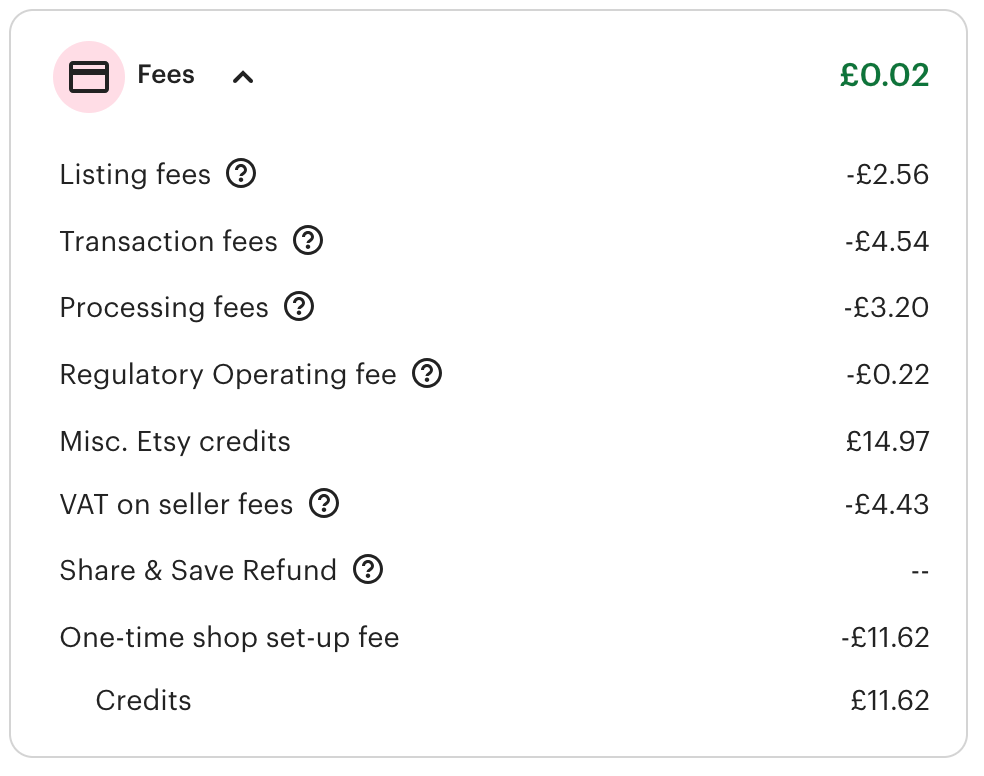
You’ll notice above that I actually got off pretty lightly here. It appears that Etsy refund your initial shop set up fee once you make a sale, and I still cannot work out what ‘misc. Etsy credits’ are – apart from the fact that they’re positive.
In total for two sales I’ve generated >£15 of fees…yikes. I had not factored that into my markups in Printful. Without those Misc. Etsy Credits Id have lost money on my two sales easily. You’ll notice the ‘share and save refund’ line. This is where if you drive your own traffic to the site (rather than relying on Etsy search) you get reduced fees – this isn’t turned on by default, and I only found it after the two sales were made. The link I’m sharing is exactly the same, but because I’ve switched this setting on, my fees will be less. Feels shady on Etsy’s behalf, they already know if your traffic is coming in direct, making you have to ‘turn this feature on’ feels like a deceptive pattern imho.
Anyway…Etsy thinks you’re making money, Printful thinks you’re making money, but they can’t see what the other is taking (although for Printful’s part I’m pretty sure it could do a decent job of working it out for you if it wanted to). As for Printful, because they never see the money from the sale – this gets charged from your own account in order to process the order. So as soon as an order is palced in Etsy – the money to process the Printful order is taken from your account (assuming you have it) but you might not see that money for 3 days at best from Etsy. It only dawned on me a bit late that its totally possible someone orders in bulk and you can’t fulfil because you don’t have the money….even though they’ve paid you the money on another platform. This is…less than ideal, but I guess is the trade-off for having next-to-no set up cost for inventory etc.
An aside on that – for some reason Etsy paid a verfication payment fine to my account, but then couldn’t pay the balance for the sales. I had to ‘update my bank details’ and then wait a further 5 days before payment was made.
So in the end, I made two sales, paid out of pocket to fulfil those orders, eventually received the money a week later, and made a grand total of £2.46 for the effort. Would I do it again…absolutely, would I put a slightly higher markup on things…Of course.
Anyway, you can still get the prints – I’m planning a few other things to share and put up for sale.
I’m also planning to update this post with bits I missed too.
Oh and if you like gravel cycling, I did another thing. But that’s a post for another day (or another blog maybe).

 alistairuff
Leave a comment